cjy
UPS: Simplifying Help and Support
Role: Experience Designer
Agency: Material Plus
Timeline: 12 weeks


project overview
Over time, UPS support pages had grown to over 495 disconnected entries, leading to high call volumes - over 83,000 monthly calls on average. User dissatisfaction was reflected in a -80 NPS and 48% CSAT score. The existing experience lacked consistency, was content-heavy, and failed to support efficient self-service.
As part of a UX redesign initiative, our team evaluated the existing flows, identified key pain points through analytics and usability testing, and restructured the information architecture to make support content easier to find and understand.
Our goal was to simplify navigation, reduce user friction, and create a more intuitive, self-service experience that improves resolution speed while decreasing reliance on live support.
Across 3 rounds of usability testing, the redesigned Help & Support experience delivered measurable improvements in clarity, efficiency, and user engagement.
results at a glance

prototype video
discovery process
To inform design decisions, our team conducted:
-
Current state analysis including comprehensive site maps and competitive/landscape analyses
-
ForeSee feedback analysis and data analytics
Insights from this discovery phase guided the restructuring of content into focused, scannable content buckets designed for faster findability and reduced cognitive load.
Out team collaborated closely with UPS’s Global Business Services (GBS) to review and classify all existing content - determining what was outdated, needed revision, or required additional stakeholder input.
These revised FAQs were integrated into a low-fidelity prototype used for early user testing.

current state analysis
Help & Support Main Page
Tracking Support
Tracking Support Articles


site map (tracking)
process
Mapped all paths to and from the Help & Support Landing Page and Tracking Support Page
key takeaways
-
Tracking Support (#1 Topic) is buried at the bottom of the main H&S page
-
Top-visited article "How Do I Change My Delivery?" is prioritized on the main H&S page
-
Only 2 Tracking Support articles are accessible from the main H&S page - though they are hidden in the Tracking FAQ accordions
-
The links to the top 3 most-accessed Tracking Support articles are buried within Tracking Support


key takeaways from competitive analysis

key takeaways from landscape analysis

key takeaways from adobe analytics

ux optimization goals
📦 Increase self-service success and reduce support escalations
📦 Improve content clarity and reduce redundant or outdated support pages
📦 Consolidate 495+ fragmented pages into a cohesive, intuitive experience
📦 Maintain global scalability and brand consistency across ups.com
design solutions implemented
Help and Support Home
🏠 Reorganized Help & Support hierarchy for clearer pathways to key topics (Shipping, Tracking, Claims, etc.)
🏠 Added contextual links and quick actions for high-volume topics
🏠 Rewrote FAQs to be concise, action-oriented, and scannable
🏠 Introduced visual cues and grouped content for intuitive browsing
Tracking Support
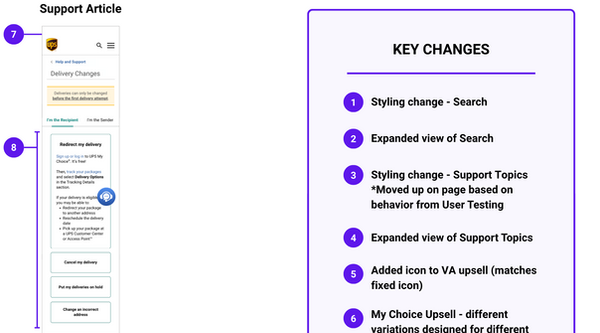
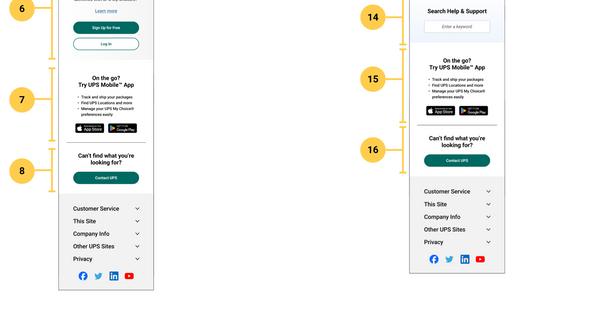
📬 Revamped and prioritized search functionality for faster self-service and improved discoverability
📬 Implemented progressive disclosure patterns with simplified, streamlined content to reduce cognitive load
📬 Added an always-accessible Virtual Assistant with messaging about live representative handoff to build trust
📬 Integrated contextual My Choice® upsells based on user behavior and page content
📬 Simplified navigation by dividing Tracking Support into four focused pages, eliminating unnecessary steps
📬 Elevated high-traffic questions (e.g., missed deliveries, delivery changes) for immediate visibility and quick access
evolution of designs





key features: original vs final designs


results and impact
Across 3 rounds of usability testing, the redesigned Help & Support experience delivered measurable improvements in clarity, efficiency, and user engagement:
✔ 29% decrease in time-to-answer, helping users find relevant information faster.
✔ 21% increase in overall user satisfaction, reflecting smoother navigation and improved usability.
✔ 38% increase in content clarity ratings, confirming that focused, scannable FAQs made key information easier to digest.
✔ 80% of users rated 4 or 5 out of 5 when asked how likely they were to use the Virtual Assistant, showing strong trust in its enhanced functionality and handoff messaging.
✔ 2× increase in interest for UPS My Choice®, driven by contextual, value-based upsell placements within the Tracking experience.
Together, these improvements demonstrate how strategic content restructuring, usability testing, and design refinement can transform customer support into an intuitive, self-service experience that builds user confidence and brand trust.


